Image Bank
You can find our IMAGE BANK in the top menu of our website, under IMAGES.
Here you’ll find a link to our Media Server as well as the login details for all images.
Login details:
Username / Email: miljogarden
Password: hello123!
Folders
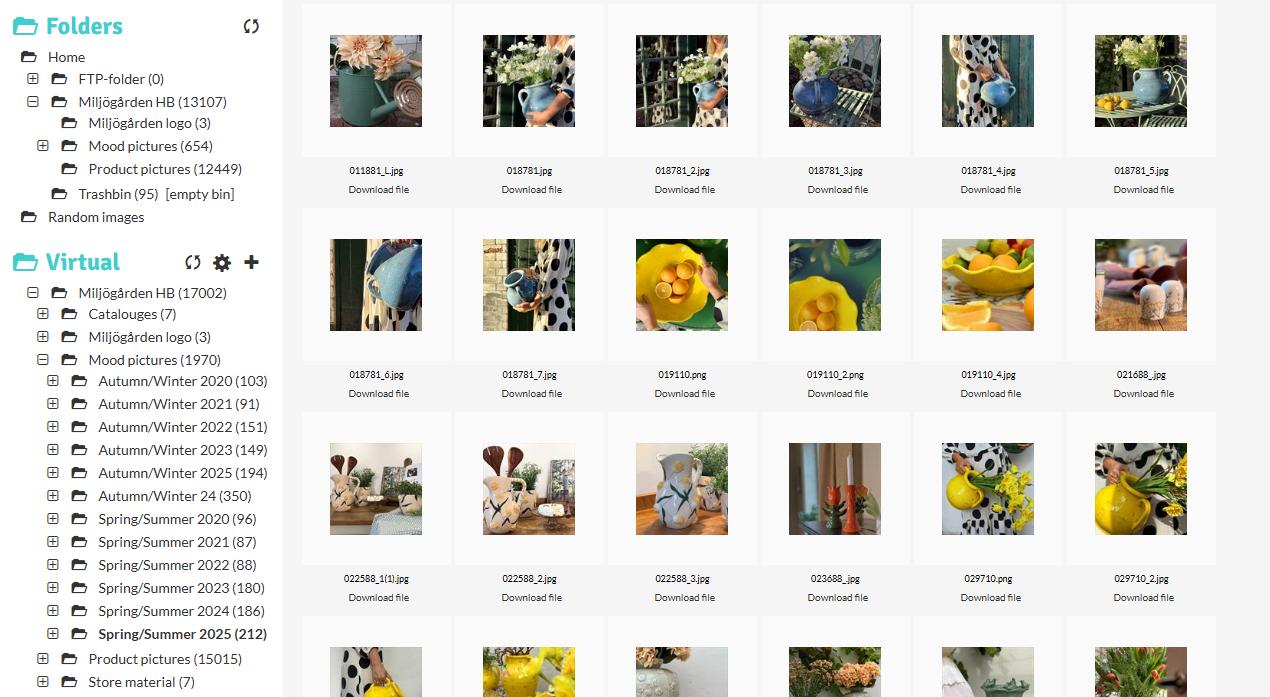
- In the left-hand column, you’ll see a tab called FOLDERS. Click the + icon to expand the different folders if they aren’t already open.
- Here you’ll find our digital catalogues, mood pictures, and product pictures.
- If you can’t find the image of a specific product you’re looking for, please contact us at info@miljogarden.com.
In our Image Bank, you can download the following:
Catalogues – Here you’ll find our digital catalogues
- When you move your cursor over a file, a shopping cart icon will appear. Click the icon to add the file to your cart (shown in the right-hand column).
- When you’re finished, click Download and the file will be saved to your computer.
Mood Pictures – Here you’ll find our lifestyle images from various seasons
- Click the text for the season you’re interested in. All corresponding lifestyle images will appear.
- When you hover over an image, a shopping cart icon will appear. Click it to add the image to your cart (in the right-hand column).
- You can add multiple images if you wish. When you’re done, click Download to save them to your computer.
Product Pictures – Here you’ll find product images of everything we currently have and have had in our assortment. You’ll also find images of sold-out items.
- Click on the text Product Pictures to view all product images.
- You can also click on the name of the season you’re interested in to see all product images for that specific season.
- Alternatively, use the Search field in the right-hand column – enter the article number of the item you want an image of.
- Then click the magnifying glass icon to search (pressing Enter/Return does not work).
- When you hover over the selected image, a shopping cart icon will appear. Click it to add the image to your cart (right-hand column).
- You can add multiple images if you wish. When you’re finished, click Download and the images will be saved to your computer.